INDEPENDENT WORK. INTELLIGENT ACCOUNTING.

Less bookwork.
More headspace.

You do the work you love.
Let AI help with the business of it.

Meet oneFlow Freelancer. Turn everyday bills, bank statements and messy time notes into organised accounts — just by asking.

See it in flow Free to use. Yours to keep.
Your computer. Your browser. No app install.*
A little less admin. A lot more you.
oneFlow Freelancer On your computer
oneAIYour work, understood.
Here's my Telstra bill. Can you sort it out?
Telstra_May.pdfPDF document · 124 KB✓
Consider it handled.

I've read your bill and prepared the details.

✓Read✓Understand✓Prepare
BILL READY TO REVIEW Ready
Telstra$132.00
CategoryTelephone
GST included$12.00
75% business useCheck. Confirm. Done.
What can I take off your plate?
From paperwork
to peace of mind.
✓
TRY A LITTLE ONEAI
Illustrative conversations and sample data.
AI from the first conversation Local by design Your data stays yours Free, with optional support
MEET YOUR NEW WAY OF WORKING

Start with what you have.
oneAI finds the flow.

A PDF. A photo. A few hurried notes.
You don't need to speak accounting.
Just tell oneFlow what you need.

01 / EVERYDAY BILLS

Paperwork in.
Bill created.

Drop in your Telstra telephone bill, electricity invoice or council rates notice. oneAI pulls out the supplier, dates, amounts and GST, then prepares a bill for your review.

Even the business / private split.
02 / WORK YOU'VE DONE

Rough notes.
Polished invoices.

“Turn these time notes into an invoice.” oneAI organises your hours, applies your rate and tax, and prepares clear line items. Less rewriting. More getting paid.

Your words, made billable.
03 / MONEY IN MOTION

A statement.
A clearer picture.

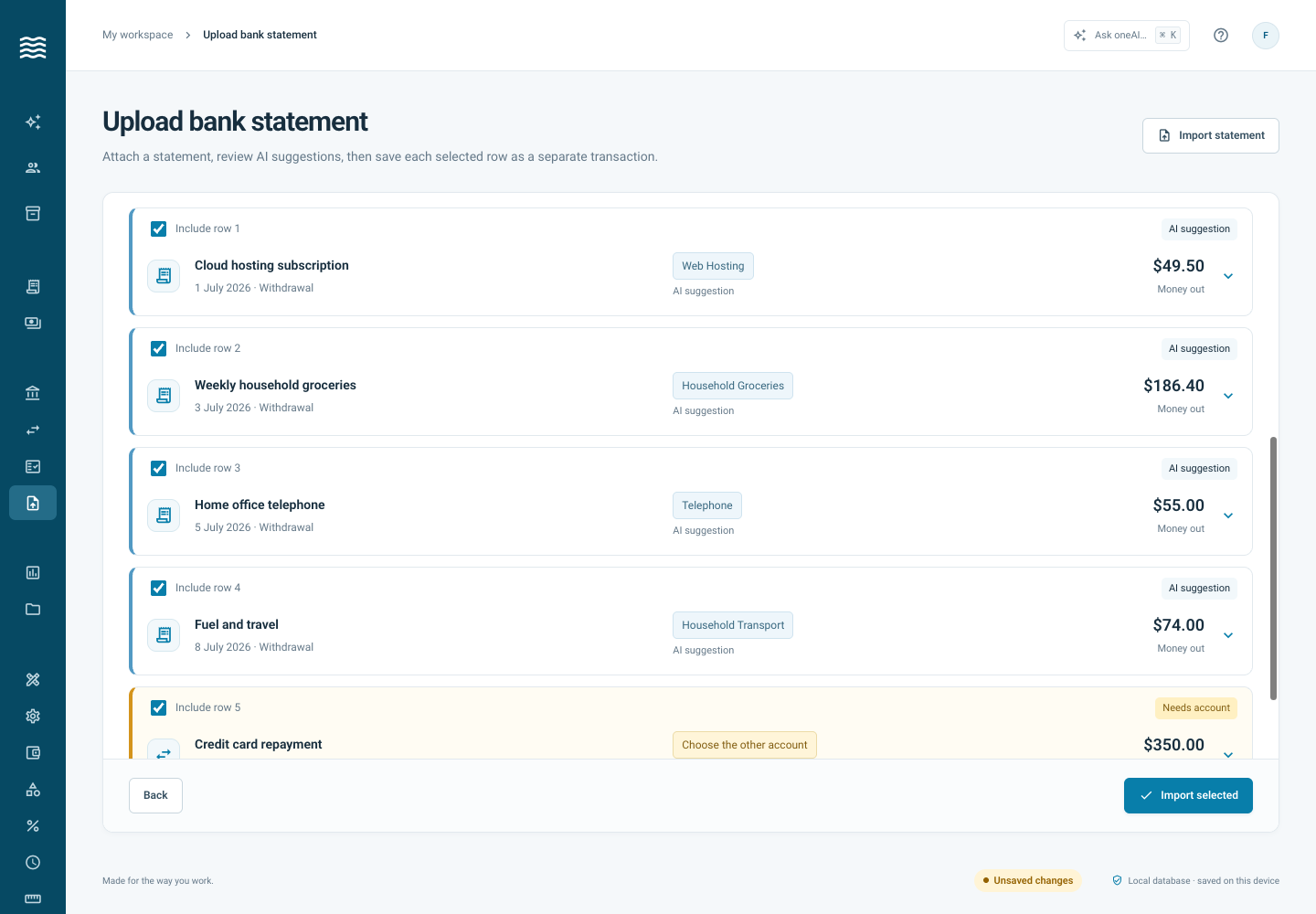
Upload a bank statement and let oneAI extract transactions, suggest categories and flag possible duplicates. Review the details, import, then reconcile with confidence.

Remembers how you categorise.
LESS CLICKING. MORE CONVERSATION.

Feels like a conversation.
Works like an extra pair of hands.

Ask. Attach. Let oneAI connect the dots.
Follow the stages and see the details that matter.

Swipe to explore the conversation →Full example
Example oneAI conversation: a Telstra bill progresses through reading, extracting details, matching the Telephone category and preparing a $132 bill for review.
A bill becomes a clear next step. Supplier, amount, GST and private use — brought together. Example conversation
Core accounting works without AI, too.

AI is optional. Connect your own OpenAI API key to enable oneAI.
AI requests and attached documents go directly to OpenAI; provider usage charges apply.

THE LITTLE DETAILS. ALL JOINED UP.

AI-first.
Accounting at heart.

Smart help is only half the story.
Underneath, a practical workspace keeps
the everyday details together.

Your accounts, in one place

Manage everyday accounts, savings, credit cards and loans. See balances reflect your deposits, withdrawals and transfers.

The way your business works

Split transactions, set hourly or daily units, customise categories and tax codes, and track business and private use.

Reconcile with confidence

Match statement entries to your transactions, save your progress and get to an exact balance. Completed movements stay protected.

Less repeated thinking

Remembered category matches do the familiar work. AI suggests the rest, with possible duplicates flagged for your review.

A conversation that does things

Add accounts, update categories and queue up requests in plain English. oneAI works through them and reports what changed.

A trail you can follow

Keep an activity history, check database integrity and download your SQLite backup. Your records, in a file you can keep.

BUDGET WITH INTENTION. SAVE WITH A PLAN.

A little less spending.
A little more possibility.

Make your money work towards the things that matter to you. Ask oneAI to explore your spending, build a budget and find everyday costs worth another look.

01

A budget that fits your life

Plan around regular bills and income that changes from month to month. See where your money goes and decide where you'd like it to go instead.

02

Give your savings a purpose

A buffer between projects. New equipment. A proper break. Set a goal and ask AI to compare monthly saving amounts and timeframes.

03

Find expenses you could reduce

Spot recurring charges, unused subscriptions and spending patterns. Explore small changes and see what they could add to your savings.

Start with a conversation
oneAIEXAMPLE CONVERSATION
Where could I trim my monthly expenses without changing everything?

Let's start with a few recurring costs you could review.

Phone planCompare a lower-cost option$24 / month
Unused subscriptionsReview your upcoming renewals$21 / month
Account feesCheck fee-free eligibility$10 / month
Potential room in your budget$55 / month

That's $660 towards a savings goal over a year, if those savings continue.

Illustrative expenses and estimates. You choose which changes make sense.

A SMALLER FOOTPRINT. A LITTLE MORE INDEPENDENCE.

Your business lives here.
On your computer.

oneFlow runs in your browser and stores your workspace locally. Your accounts don't need to live on someone else's accounting server.

No desktop app to install* No oneFlow cloud account required AI when you want it. Your API key.
How local hosting works
YOUR COMPUTER
Your browser. Your workspace.
Your local databaseAccounts · transactions · categories
Only when you ask AI
OpenAIYour key · your AI requestsOPTIONAL

Your database stays local. Messages and documents you submit to AI are sent to OpenAI for processing.

INDEPENDENT SOFTWARE, FOR INDEPENDENT PEOPLE.

A little freedom.
Without the fee.

oneFlow Freelancer is free to use. No software subscription. No licence fee. Just a useful tool to make running your own business a little easier.

Support the development.
Receive support.
Be part of the oneFlow community.

Optional Patreon support helps fund oneFlow's future development and other useful products for people like you. Get help with oneFlow, share feedback and ideas, and connect with the oneFlow community. The software stays free, whether you contribute or not.

Say hello to the maker
ONEFLOW FREELANCER
$0 / to use

More time for what matters.

The accounting workspace Your data, on your computer Optional AI with your own key Support & community through PatreonAI provider usage is billed separately by OpenAI.
Patreon support is entirely voluntary.
Find your flow
A FEW GOOD QUESTIONS

A little more
clarity.

Still curious?
Let's talk

Is oneFlow really free?

Yes. oneFlow Freelancer is free to use. Optional Patreon support lets you support future development and other similar products, receive help with oneFlow, and be part of the oneFlow community. You don't need to contribute to use the software. If you enable AI, OpenAI charges for your API usage separately.

Do I need AI to use it?

No. Accounts, transaction forms, categories, tax codes, manual reconciliation and local storage work without AI. To use oneAI conversations and document processing, add your own OpenAI API key in AI settings. AI needs an internet connection.

Where does my data go?

Your workspace database is saved in your browser's local storage on your computer. The browser profile and site address matter: a different browser or address opens separate storage. Messages and files you submit to oneAI are sent directly to OpenAI. Download backups regularly, especially before clearing browser data or moving to another address.

What does “no installation” mean?

There is no desktop application to install. Your browser runs oneFlow. Open an HTTPS-hosted copy, or use a startup script to serve the files locally on your Mac or Windows PC. The scripts start a small local web server and open your browser automatically. They require Python 3.10 or newer, which may need a one-time installation. Keep the server window open while you work; double-clicking the app's HTML file directly won't work.

See the Mac and Windows steps
Can I check what AI has done?

Statement imports give you an editable preview before you import. Review categories, tax, amounts and duplicate flags, then confirm. Conversation commands can make changes directly and report their results; saved changes appear in the activity history. Check AI-generated details against your source documents.

YOUR WORK HAS BETTER THINGS TO DO.

Make a little room
for your next big thing.

Less admin in your day. More you in your business.

Open oneFlow Freelancer Free to use. No oneFlow account required.Running locally? Start here ↓

* Your computer. One simple startup script.

There is no oneFlow desktop app to install. For local hosting, a small startup script starts a web server on your own computer and opens oneFlow in your browser. Your accounting still runs in the browser, with your database stored locally.

Want to be an early adopter? Help shape oneFlow Freelancer and share your feedback. Email contact@softwaredevelopment.com.au to get involved.

Startup scripts & Mac / Windows requirements

Choose your computer below. Both scripts open http://localhost:8080 automatically once the local server is running.

On a Mac

You need the oneFlow files, a current browser and Python 3.10 or newer available as python3. If you need Python, use the official Mac download.

Download Mac startup script
  1. Put start-oneflow.command beside oneFlow's index.html and app folder.
  2. For the first setup only, open Terminal in that folder and run:
chmod +x start-oneflow.command

Then double-click start-oneflow.command. It starts the server and opens your browser. Use that script each time you want to start oneFlow.

Python is needed only for this local hosting option. Any suitable localhost or HTTPS static host works or run from oneflow.com.au directly [coming soon] (software runs from your computer, browser downloads it). Chrome is the currently verified browser. Keep the same browser and address for your workspace.